
By Hendra Setiawan, maker of Embed for Tally
Tally stores every form submission in your Tally account, not in your WordPress database, even when the form is embedded on a WordPress site. To keep a copy in WordPress, you can download a CSV from Tally, send each submission to WordPress with Zapier or Make, or receive submissions directly through Tally’s webhook with the Embed for Tally Pro plugin.
On this page
Quick comparison
Where does Tally store form submissions?
In your Tally account. Embedding a Tally form in WordPress, with a block, shortcode or embed code, only displays the form. Every answer goes to Tally, and you read it in the form’s Submissions tab in Tally.
Can Tally send submissions to WordPress?
Not by itself. Tally’s built-in integrations include Google Sheets, Notion, Airtable, Slack and webhooks, but not WordPress. To get submissions into WordPress, you need one of the three methods below.
1. Download Tally submissions as a CSV
In Tally, open the form, go to Submissions and click Download CSV. It’s quick, but it’s a snapshot: new submissions only reach you when you download again, and the file stays on your computer.
2. Send Tally submissions to WordPress with Zapier or Make
Zapier, Make and n8n can create a WordPress post or custom entry for every Tally submission. It works, but you pay for another tool, map every field by hand, and fix the automation when the form changes.
3. Save Tally submissions in WordPress with a webhook
Embed for Tally Pro is an add-on for the free Embed for Tally plugin. It receives each submission from Tally’s webhook and saves it on your site as it comes in. Webhooks are included in Tally’s free plan.
- Install Embed for Tally and Embed for Tally Pro, and enter your licence key.
- In WordPress, go to Tally Forms → Submissions, click Connect a form and paste the form’s link.
- In Tally, open the form’s Integrations → Webhooks, paste the endpoint URL and signing secret from WordPress, and click Connect.
- Submit a test response. It appears in WordPress within seconds.
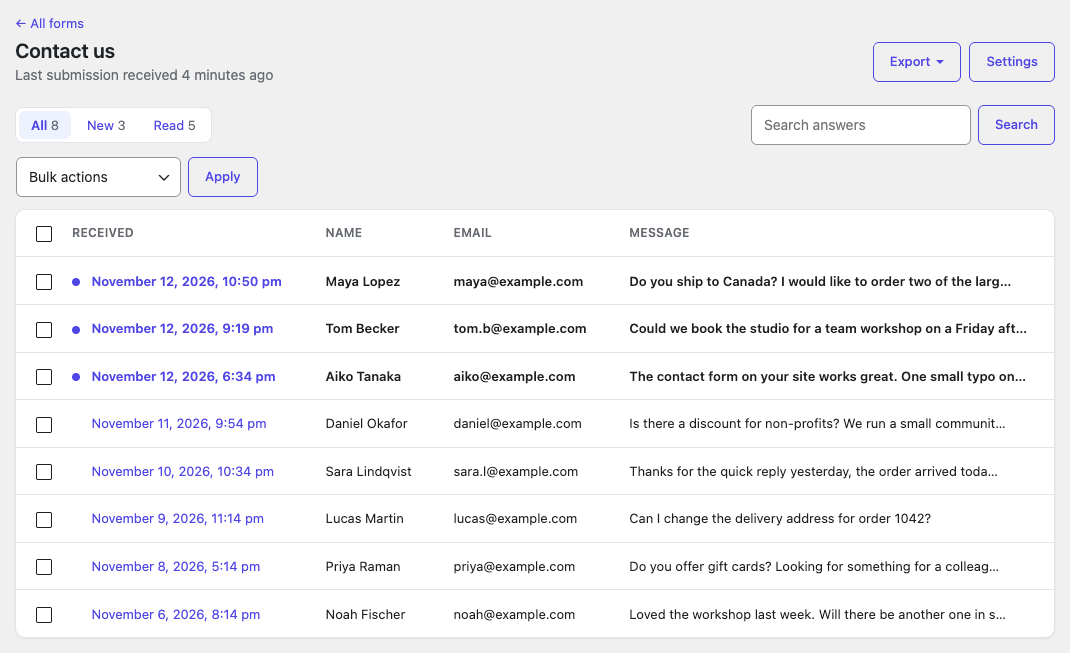
What you get:
- A submissions list for each form, with search and read/unread status.
- Excel and CSV export of all submissions, or only the filtered ones.
- Email alerts with the answers; replying goes to the person who submitted.
- An import of older submissions from Tally’s CSV, skipping duplicates.
If your site is briefly down, Tally retries the webhook later (after 5 minutes, 30 minutes, 1 hour, 6 hours and 1 day), and Pro saves each submission only once.
Embed for Tally Pro
From $39 a year, with a 14-day money-back guarantee. See what Pro does →
Which method should you use?
Use the CSV download if you check responses rarely. Use Zapier or Make if you already pay for one and want submissions in other tools as well. Use Embed for Tally Pro if you want every submission in WordPress automatically, without a third service.
FAQ
Does embedding a Tally form in WordPress save submissions in WordPress?
No. The form only displays on your site; submissions are stored in Tally.
Do I need a paid Tally plan to send submissions to WordPress?
No. Tally webhooks are available on the free plan.
Can I import Tally submissions I already have?
Yes. With Embed for Tally Pro, download the CSV from Tally and import it; submissions already saved are skipped.
Is there a free way to keep Tally submissions in WordPress?
Not automatically. The free option is downloading Tally’s CSV by hand.
New to Tally and WordPress? Start with how to embed a Tally form in WordPress.